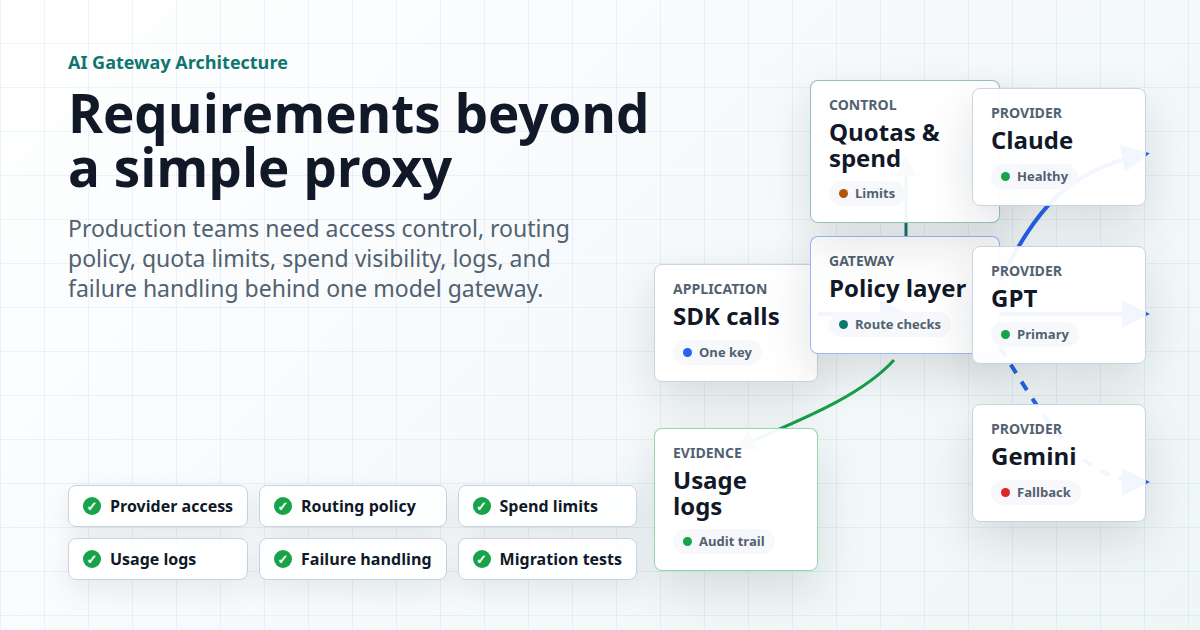
An AI API gateway becomes useful when it does more than forward HTTP requests. In production, the gateway has to control who can call which models, how traffic is routed, what happens when a provider fails, how quota and spend are enforced, and what logs remain after an incident.
That is the practical gap behind the term. Vercel describes its AI Gateway around one API key, hundreds of models, routing, observability, and cost-aware controls. Pydantic's AI Gateway documents provider formats, routing groups, fallback, and spend requirements. IBM frames AI gateways as a specialized middleware layer for model integration, management, observability, security, and cost control. Moesif's comparison page emphasizes model routing, governance, latency, analytics, and cost attribution. Those are useful category signals, but they still leave teams with an implementation question: what should you require before production traffic depends on a gateway?
This checklist is written for platform engineers, application teams, and technical leads evaluating an AI API gateway for real workloads. It separates general category requirements from Flatkey-specific claims. Flatkey's public product copy says it provides one API key, an OpenAI-compatible base URL at https://router.flatkey.ai/v1, clear pricing, unified billing, and one dashboard for keys, usage, and routing. Treat the checklist below as the acceptance test for any gateway, including Flatkey.
AI API Gateway Requirements Checklist
A proxy only answers "where should this request be forwarded?" A production AI API gateway has to answer "is this request allowed, affordable, observable, recoverable, and compatible with the application contract?" Use this matrix during evaluation.
| Requirement | Production Question | Evidence To Ask For |
|---|---|---|
| Provider access | Can one integration reach the approved models and endpoint families the app needs? | Supported providers, model catalog, endpoint formats, and a staging request. |
| Request compatibility | Can current SDKs keep working with minimal base URL or provider config changes? | OpenAI-compatible, Anthropic, Gemini, image, video, or other protocol examples. |
| Routing policy | Can traffic be routed by model, provider, group, account, cost, priority, or availability? | Routing configuration, fallback rules, and route readback in logs. |
| Quota and spend controls | Can teams prevent runaway token, image, video, and agent costs? | Per-key limits, budget views, pricing data requirements, and over-limit behavior. |
| Observability | Can engineers debug a bad response, latency spike, or provider error after the fact? | Request ID, route, model, token usage, cost, status, latency, retries, and error details. |
| Failure handling | Does the gateway know when to retry, switch, queue, or fail closed? | Timeout policy, retry limits, circuit behavior, fallback ladder, and rollback process. |
| Security boundary | Can access be scoped without spreading provider keys through every application? | Gateway keys, provider credential storage, key rotation, team ownership, and audit trail. |
| Procurement and ownership | Who owns provider accounts, invoices, usage review, and policy changes? | Admin dashboard, billing workflow, owner map, and operational runbook. |
1. Provider Access Is Not Just A Model List
The first requirement for an AI API gateway is model access, but a static model list is not enough. Production teams need to know which endpoint families are supported, which models are actually usable for their account, and whether the gateway can serve the modality the workflow needs.
For text applications, that usually means chat completions, responses-style APIs, and embeddings. For product teams using generated media, it may include image generation, image editing, video generation, and model-specific asynchronous job handling. For coding tools or AI agents, the requirement may be Anthropic Messages, OpenAI-compatible tools, Gemini-compatible request shapes, or a custom provider format.
Ask for three proofs before you count a model as available:
- Catalog proof: the model appears in the current catalog or pricing surface.
- Protocol proof: the gateway supports the endpoint format your SDK will call.
- Runtime proof: a staging key can make a successful request and produce a traceable usage record.
Flatkey's pricing API snapshot on June 12, 2026 returned success: true, 656 model rows, and supported endpoint metadata for OpenAI chat completions, OpenAI Responses, Anthropic Messages, Gemini generateContent, image generation, and video generation. Use that as dated product evidence, then verify the exact model and endpoint your rollout needs on the live pricing page.
2. Compatibility Should Reduce Migration Work
A useful AI API gateway should not force every application team to rewrite client code. For many teams, the fastest path is to keep the existing SDK and change the base URL, API key, or provider configuration.
This is why OpenAI-compatible routing is a common gateway pattern. It gives teams a familiar request shape for many model calls, then moves provider access and routing behind the gateway. Pydantic's docs show a similar idea through gateway provider strings and provider-specific base URLs. Vercel's docs show gateway usage through SDK and API examples. The details differ by vendor, but the requirement is the same: migration should be explicit, testable, and reversible.
Before you choose a gateway, document the migration plan:
- Which SDKs and services need a base URL or provider change?
- Which endpoints must remain OpenAI-compatible?
- Which endpoints require provider-native request formats?
- Which parameters are passed through, translated, rejected, or ignored?
- Which staging test proves the response and usage log are correct?
If you are evaluating Flatkey specifically, start with the OpenAI-compatible API migration guide. It covers the base URL work around https://router.flatkey.ai/v1 before you add broader routing or cost controls.
3. Routing Needs Policy, Not Magic
Routing is where an AI API gateway becomes more than a proxy. It should decide where requests go based on a policy you can explain: allowed model, provider group, upstream health, cost sensitivity, latency needs, quota state, and workflow risk.
Good routing policy starts with traffic classes. Customer-facing chat, background summarization, batch evaluation, internal coding tools, image generation, and video generation should not all share the same fallback behavior. A backup model that is acceptable for an internal draft may be unacceptable for a benchmark, regulated workflow, or customer-facing agent.
| Traffic Class | Routing Priority | Fallback Rule |
|---|---|---|
| Customer chat | Low error rate, predictable behavior, approved model family. | Fallback only to an approved equivalent or return a controlled error. |
| Background jobs | Cost control and throughput. | Queue, retry later, or use a lower-cost approved route. |
| Evaluation runs | Stable model identity. | Disable hidden fallback so results stay comparable. |
| Media generation | Endpoint compatibility, job tracking, and budget guardrails. | Fail closed unless the backup model and output contract are approved. |
| Agent workflows | Tool support, context window, auditability, and spend limits. | Fallback only when tool behavior and data boundaries remain valid. |
Flatkey's public site says it can route multiple upstream accounts with automatic switching and load balancing. That is a useful product claim, but the acceptance test is still concrete: create a staging key, send representative traffic, trigger a known failure where possible, and confirm that the selected route appears in the dashboard or readback data.
4. Quotas And Spend Controls Are Gateway Features
An AI API gateway that cannot explain cost is risky. AI traffic has variable units: input tokens, output tokens, image requests, video duration, tool calls, cached tokens, reasoning tokens, and provider-specific units. A gateway that routes correctly but loses cost context creates finance and abuse problems.
Pydantic's gateway docs are explicit about one useful principle: the gateway needs pricing data to provide spend insights and enforce spending limits. Moesif's AI gateway comparison similarly emphasizes cost attribution, tenant-specific metrics, usage patterns, and real-time monitoring. The practical requirement is that cost controls must be part of the request path, not a spreadsheet exercise after invoices arrive.
Ask these questions before production:
- Can limits be set per key, team, user, or application?
- Does the gateway enforce limits before forwarding requests upstream?
- What happens when pricing data is missing for a model?
- Can finance map usage back to model, route, project, and owner?
- Are fallback routes allowed to be more expensive than the primary route?
- Can usage records separate test, staging, and production keys?
For Flatkey evaluation, compare the live model pricing with the actual request logs after a staging run. The public product copy supports clear pricing, unified billing, and usage visibility, but each team still needs to validate the exact models, units, quotas, and billing evidence for its workflow.
5. Observability Must Survive Incidents
When a provider returns errors or a model behaves unexpectedly, the AI API gateway becomes the place engineers expect to investigate. IBM's AI gateway overview calls out centralized observability, usage tracking, detailed request and response logs, token usage counts, response times, error rates, cost accumulation, and dashboard visibility. Those are not nice-to-have fields; they are the minimum needed to debug production AI traffic.
Each request should leave enough evidence to answer:
- Which application, environment, key, and owner sent the request?
- Which model, endpoint, and provider path did the gateway choose?
- Was there a retry, fallback, timeout, rate limit, or policy rejection?
- What were the status code, latency, token usage, estimated cost, and request ID?
- Can support correlate a user report to the exact gateway event?
- Can finance reconcile the incident with spend by team or customer?
This is also where a gateway differs from a simple provider wrapper. A wrapper may make calls easier. A production AI API gateway should make the system easier to operate when calls fail.
6. Failure Handling Needs A Stop Condition
Retry and fallback behavior should be deliberate. If a request fails because of a temporary provider problem, switching can protect the user experience. If a request fails because the client sent an invalid parameter, the gateway should not spend money repeating that invalid request across multiple providers.
Define a failure ladder before enabling automatic switching:
- Retry same route: use only for clearly transient network or 5xx failures.
- Switch same model or provider group: use when another approved upstream can serve the same contract.
- Use approved backup model: use only when quality, tools, context limits, and data policy still fit.
- Queue or degrade: use for background work or non-critical tasks where delay is acceptable.
- Fail closed: use for bad requests, auth failures, unsafe content decisions, unsupported parameters, or missing approvals.
This is covered in more depth in the AI API load balancing and failover guide. For this checklist, the key point is simple: an AI API gateway should make failure behavior predictable enough to test.
7. Security And Ownership Should Be Explicit
Traditional API gateways centralize authentication, rate limiting, routing, encryption, and monitoring. AI gateways inherit those requirements and add model-specific risk: prompts may contain sensitive data, agents may call tools, media requests may expose user assets, and hidden fallback can move data to a different provider path than product owners expected.
Before production, map ownership:
- Who can create, rotate, disable, and scope gateway keys?
- Where are upstream provider credentials stored?
- Which teams can add providers, models, or routing groups?
- Which traffic can use customer data, internal data, or regulated data?
- Who reviews usage, cost, abuse signals, and incident logs?
- Who approves fallback to a different model family or provider?
For enterprise buying teams, connect this article to the enterprise AI API gateway checklist. That page goes deeper into procurement evidence, compliance review, ownership, and billing controls.
8. Migration Tests Should Be Written Before Cutover
The final AI API gateway requirement is a migration test plan. Do not wait until cutover day to discover that streaming, tool calls, image endpoints, model names, error formats, or usage logs differ from what the application expects.
A minimal pre-production test should cover:
- One successful request for every endpoint family in scope.
- One invalid request that should fail closed without fallback.
- One quota or budget scenario if the gateway supports non-production limits.
- One provider or upstream failure scenario if it can be simulated safely.
- One dashboard review showing request ID, model, route, status, usage, cost, and owner.
- One rollback path back to the previous provider configuration.
This test plan turns vendor claims into operational evidence. If a gateway cannot show successful requests, controlled failures, visible usage, and a rollback story in staging, it is not ready for production traffic.
How Flatkey Fits This AI API Gateway Checklist
Flatkey positions itself as a unified AI API gateway and admin dashboard. Current public copy references one key for Claude, GPT, Gemini, DeepSeek, Qwen, Seedance 2.0, GPT Image, and more; an OpenAI-compatible base URL; clear pricing; unified billing; a dashboard for keys, usage, and routing; and automatic switching and load balancing across upstream accounts.
That positioning maps well to the operational checklist above. The responsible evaluation path is still practical:
- Create a Flatkey staging key from the dashboard.
- Point one non-production client at
https://router.flatkey.ai/v1. - Run one successful request for the workflow's model and endpoint family.
- Confirm the usage, cost, model, key, and route evidence in the dashboard.
- Review the live pricing page for the exact model units.
- Decide which traffic can use automatic switching and which traffic must fail closed.
If that staging test passes, Flatkey can reduce provider account work and integration sprawl. If it does not, the checklist tells you exactly what evidence is missing before production cutover.
FAQ
What is an AI API gateway?
An AI API gateway is a control layer between applications and AI model providers. It can centralize model access, authentication, routing, quota enforcement, usage logging, spend visibility, and failure handling for AI workloads.
How is an AI API gateway different from a regular API gateway?
A regular API gateway manages conventional API traffic. An AI API gateway handles model-specific concerns such as provider formats, prompt and response traffic, token usage, model routing, fallback, multimodal endpoints, cost controls, and AI-specific observability.
Do I need an AI API gateway if I only call one model?
Maybe not immediately. The need becomes stronger when multiple applications, teams, keys, providers, models, quotas, invoices, or fallback paths are involved. Even one-model teams may need gateway controls if they require centralized usage logs, budget limits, or key management.
What should I test before using an AI API gateway in production?
Test provider access, SDK compatibility, allowed models, successful requests, bad requests, quota behavior, failover behavior, usage logs, cost records, dashboard visibility, and rollback. The gateway should produce evidence for each test, not just a successful response.
Is Flatkey an AI API gateway?
Flatkey's public positioning describes it as a unified AI API gateway and admin dashboard with one key, model access, an OpenAI-compatible router endpoint, pricing, billing, usage, routing, automatic switching, and load balancing. Teams should still validate the exact behavior they need in staging.
Final Takeaway
An AI API gateway is production-ready only when it proves more than request forwarding. Require model access, SDK compatibility, routing policy, quotas, spend controls, logs, failure handling, security ownership, and migration tests. Then run the checklist against a real staging workload.
Flatkey is built for teams that want one key, one compatible route, and one dashboard for model access and operations. To test that path with your own workflow, get a key and verify the checklist before moving production traffic.