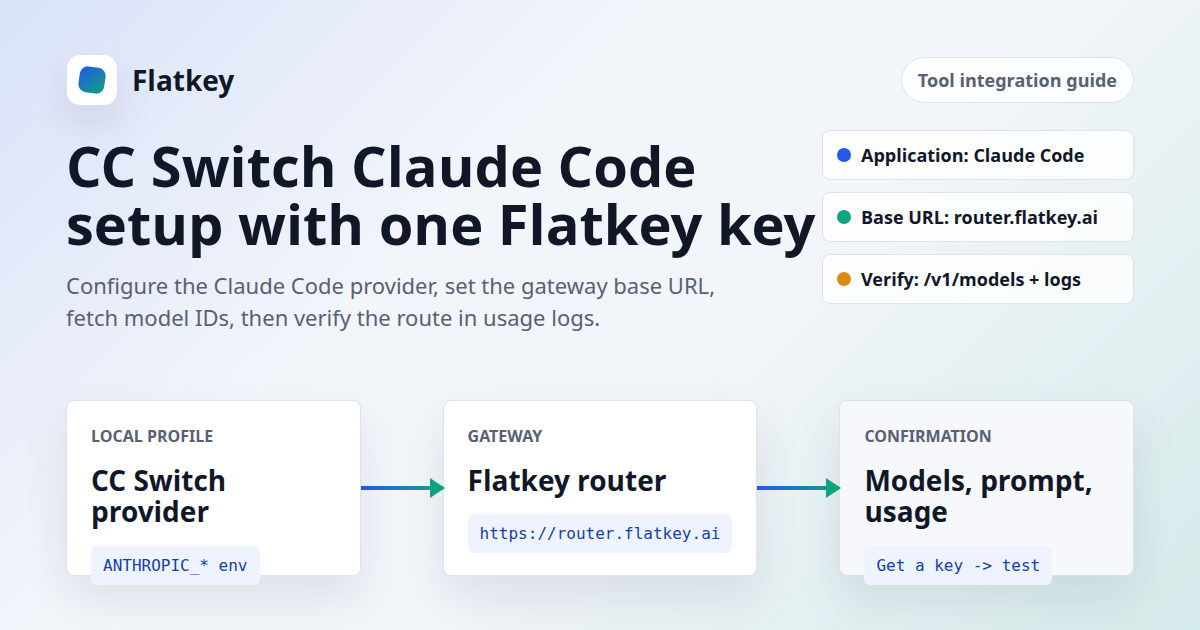
If you are searching for CC Switch Claude Code, you probably already have the coding assistant installed. The setup problem is narrower: you need CC Switch to write the right Claude Code provider config, use the right Flatkey key, point at the right base URL, pick models that your key can actually access, and verify the request in usage logs.
This guide covers the practical path for CC Switch Claude Code routing with Flatkey and the NewAPI-style one-click workflow. NewAPI's current CC Switch docs describe a ccswitch:// deep link import from the New API token page. Flatkey users can use the same CC Switch configuration surface manually: add a Claude Code provider, paste a Flatkey API key, set the Claude Code gateway base URL, fetch models, save the profile, and verify the route.
The guide is text-only. It does not use app screenshots because the current CC Switch and Flatkey UI flow should be screenshot-reviewed before publishing step images.
Quick Answer: CC Switch Claude Code Settings For Flatkey
For a Flatkey-backed CC Switch Claude Code setup, create a Claude Code provider in CC Switch and use the Flatkey router as the gateway. For Claude Code's Anthropic Messages-style requests, use the root gateway URL, not the OpenAI chat-completions path.
| CC Switch Field Or Config | Flatkey Value | What To Verify |
|---|---|---|
| Application | Claude or Claude Code |
Do not configure the Codex or Gemini app when the target is Claude Code. |
| Provider tab | App-specific Provider for Claude Code, or Universal Provider if you also sync Codex/Gemini |
Universal providers need a post-sync check because each app may expect a different URL shape. |
| Name | Flatkey Claude Code |
Use a name that will be clear in CC Switch tray switching later. |
| API Key | Your Flatkey API key | Create or copy it from the Flatkey dashboard. Never paste a real key into shared docs. |
| Claude Code base URL | https://router.flatkey.ai |
Use this for ANTHROPIC_BASE_URL. Claude Code then reaches paths such as /v1/messages. |
| OpenAI-compatible base URL | https://router.flatkey.ai/v1 |
Use this for OpenAI-compatible clients and model-fetch checks that call /v1/models. |
| Main/Sonnet/Opus/Haiku models | Model IDs from the CC Switch fetch result, Flatkey console, or pricing catalog | Use exact model IDs. Do not use marketing names or model-family labels. |
| Verification | Run a tiny Claude Code prompt and review Flatkey usage logs | The setup is not finished until the request appears in the Flatkey dashboard. |
If your CC Switch form exposes an advanced JSON editor, the Claude Code profile should resolve to a shape like this. Use a placeholder in documentation; never store a live key in a repo.
{
  "env": {
    "ANTHROPIC_AUTH_TOKEN": "sk-fk-your-flatkey-key",
    "ANTHROPIC_BASE_URL": "https://router.flatkey.ai",
    "ANTHROPIC_MODEL": "your-claude-model-id"
  }
}
Claude Code also supports ANTHROPIC_API_KEY. Use one auth variable, not both, unless you intentionally understand the precedence. For bearer-style gateway routing, ANTHROPIC_AUTH_TOKEN keeps the mapping explicit because Claude Code sends it as the Authorization header value.
Where NewAPI Fits In The CC Switch Workflow
NewAPI's current CC Switch documentation says the New API console can add a Chat Settings shortcut with this JSON:
{ "CC Switch": "ccswitch" }After that, the New API token management page can expose a CC Switch option that launches CC Switch through the ccswitch:// deep link and opens the provider import dialog. NewAPI's docs describe the dialog fields as application type, name, main model, and Haiku/Sonnet/Opus model selections.
For Flatkey, use the same concept without claiming a NewAPI token-page import. If your key is a Flatkey key, add the provider directly in CC Switch. If your key lives in a NewAPI deployment, use the NewAPI one-click import. The important distinction is simple: CC Switch manages the local Claude Code configuration, while Flatkey or NewAPI handles the upstream routing layer.
Before You Start
Before changing the CC Switch Claude Code provider, confirm these prerequisites:
- CC Switch is installed on the machine where Claude Code runs.
- Claude Code is already installed and can open normally.
- You can sign in to Flatkey and open the dashboard.
- You have a Flatkey API key for this workstation or developer.
- You know at least one Claude model ID available to your Flatkey account.
- You can review Flatkey usage logs after the first test request.
Do not use a shared production key for the first test. Create a limited key named after the tool and owner, such as cc-switch-lee or claude-code-devbox. That keeps the first CC Switch Claude Code smoke test easy to audit and easy to revoke.
Step 1: Create Or Copy A Flatkey API Key
Open the Flatkey dashboard and create a key for Claude Code usage through CC Switch. Copy it once and store it in your password manager or team secret manager.
The CC Switch API Key field should contain the Flatkey key. Do not paste an Anthropic, OpenAI, Google, or provider-specific key into this profile unless you are intentionally configuring that direct provider instead of Flatkey.
For teams, create separate keys by user, device, or environment. One shared key may work technically, but it makes usage review and revocation harder later.
Step 2: Add A Claude Code Provider In CC Switch
Open CC Switch and go to the Claude Code provider area. The CC Switch user manual describes two add paths: app-specific providers for the selected app, and Universal Provider for a shared configuration across Claude Code, Codex, and Gemini.
For the first CC Switch Claude Code Flatkey setup, start with an app-specific Claude Code provider:
- Open CC Switch.
- Select Claude or Claude Code in the application switcher.
- Click the + button to add a provider.
- Choose a custom provider path if there is no Flatkey preset.
- Set the provider name to
Flatkey Claude Code. - Paste your Flatkey API key.
- Set the Claude Code gateway base URL to
https://router.flatkey.ai. - Choose model IDs for Main, Sonnet, Opus, and Haiku only after confirming they are available to your account.
If you use a Universal Provider, fill Name, API Key, and Endpoint URL, then check the apps you want to sync. After syncing, inspect the generated Claude Code config. For Claude Code, the active base should be https://router.flatkey.ai. For OpenAI-compatible app configs, https://router.flatkey.ai/v1 is usually the expected base URL.
Step 3: Fetch Models Before Picking Main, Sonnet, Opus, And Haiku
CC Switch documents a Fetch Models action beside model inputs. It uses the configured API key to call an OpenAI-compatible /v1/models endpoint and then lets you select returned model IDs from a dropdown.
For this article, a dated Flatkey check on June 11, 2026 returned HTTP 200 from https://router.flatkey.ai/v1/models with a model-list response for the configured test key. The returned examples included Claude-family model IDs such as claude-sonnet-4-6, claude-sonnet-4-5, claude-opus-4-7, and claude-haiku-4-5. Treat those examples as a current snapshot, not a permanent model recommendation.
Use this model selection rule:
- Main Model: choose the Claude model you want Claude Code to use by default.
- Sonnet Model: choose the balanced model your team expects for daily coding.
- Opus Model: choose a higher-capability model only if your budget and access allow it.
- Haiku Model: choose a lightweight model for faster or background tasks if available.
If Fetch Models fails, do not guess. Open the Flatkey console or pricing catalog, copy one exact Claude-compatible model ID, and test with only that model first.
Step 4: Save, Sync, And Check The Generated Claude Code Config
After you save the provider, CC Switch writes the active provider configuration for Claude Code. The exact file path can vary by CC Switch version and app scope, but Claude Code's official settings docs confirm that environment variables can be configured through settings.json under the env key.
Check that the generated config does not contain conflicting auth values. A clean Flatkey profile should have one of these patterns:
# Bearer-token gateway style
ANTHROPIC_AUTH_TOKEN=sk-fk-your-flatkey-key
ANTHROPIC_BASE_URL=https://router.flatkey.ai
or:
# API-key style
ANTHROPIC_API_KEY=sk-fk-your-flatkey-key
ANTHROPIC_BASE_URL=https://router.flatkey.ai
Do not leave an old direct Anthropic key active in your shell while testing a new CC Switch Claude Code profile. If the shell still exports a different ANTHROPIC_API_KEY, it can make troubleshooting harder because the active process may not be using the CC Switch profile you think it is using.
Step 5: Verify In Claude Code And Flatkey Usage Logs
Open a fresh terminal after enabling the Flatkey provider in CC Switch. Claude Code can support hot-switching in some CC Switch paths, but a new terminal removes shell-state confusion during the first test.
- Start Claude Code.
- Check the active model or status in Claude Code.
- Send a tiny prompt, such as asking it to reply with one short sentence.
- Open the Flatkey dashboard.
- Review usage logs for the request time, model ID, and key name.
The CC Switch Claude Code setup is complete only when all three layers agree: CC Switch shows the Flatkey provider as active, Claude Code uses the expected model/base URL, and Flatkey logs show the request.
Troubleshooting CC Switch Claude Code With Flatkey
| Problem | Likely Cause | Fix |
|---|---|---|
| Authentication error | The key is wrong, disabled, copied with spaces, or not a Flatkey key. | Create a fresh key in Flatkey, paste it again, and verify you are using either ANTHROPIC_AUTH_TOKEN or ANTHROPIC_API_KEY, not conflicting values. |
| 404 or wrong endpoint path | The URL includes the wrong path shape for Claude Code. | For Claude Code, use https://router.flatkey.ai. For OpenAI-compatible model fetch or other clients, use https://router.flatkey.ai/v1. |
| Fetch Models fails | The key cannot call /v1/models, the base URL is wrong, or the endpoint is temporarily unavailable. |
Use https://router.flatkey.ai/v1 for the model-fetch path, then fall back to exact model IDs from the Flatkey console. |
| Claude Code still uses the old provider | An old terminal process or shell export is overriding the CC Switch profile. | Open a new terminal, check shell environment variables, and make sure the Flatkey provider is enabled in CC Switch. |
| Model selection works but requests fail | The selected model is listed but not available to your key, group, balance, or current account policy. | Test one known-access model first. Review Flatkey account access, balance, quotas, and usage logs. |
| MCP tool search changes behavior | Claude Code treats non-first-party base URLs as gateway routing. | Follow Claude Code's gateway guidance before enabling advanced tool-search behavior through a proxy. Do not enable gateway-specific flags unless your gateway forwards the required blocks. |
Most CC Switch Claude Code failures come down to four fields: key, base URL, model ID, and active profile. Check those before rebuilding the whole CC Switch database.
CC Switch Vs A Claude Code Router
CC Switch and a Claude Code router solve different parts of the workflow. CC Switch is the local configuration manager. Flatkey is the routing and access layer.
| Layer | What It Does | What It Does Not Do |
|---|---|---|
| CC Switch | Stores provider profiles, switches Claude Code/Codex/Gemini configs, manages model fields, and can import providers through deep links. | It is not the upstream model account, billing system, or router. |
| Claude Code | Runs the coding assistant and reads the active environment/config values. | It does not manage your team's multi-provider keys or billing by itself. |
| Flatkey | Provides one key, gateway endpoints, model access, usage visibility, routing, and billing controls for supported models. | It does not replace CC Switch's local profile-switching UI. |
If you only need one permanent gateway setting, you can configure Claude Code directly. If you switch among several providers, workstations, or model tiers, the CC Switch Claude Code workflow gives you a cleaner control surface. If you are also migrating app code to a gateway, read the OpenAI-compatible API migration guide. If you are deciding between a Claude-only proxy and a broader gateway, read Claude API proxy vs router.
Recommended Team Rollout
For one developer, one Flatkey key and one CC Switch provider is enough. For a team, treat the CC Switch Claude Code setup as a small access-control rollout.
- Create a named Flatkey key per developer, workstation, or environment.
- Document the approved Claude model IDs and which tier each maps to in CC Switch.
- Use quotas before inviting more users into the same routing setup.
- Review usage logs after the first day, not only after a billing surprise.
- Keep screenshots out of public docs until the current UI is reviewer-confirmed.
- Use NewAPI one-click import only for keys managed in NewAPI; use manual Flatkey provider setup for Flatkey keys.
FAQ
What is a CC Switch Claude Code setup?
A CC Switch Claude Code setup is a provider profile in CC Switch that writes the endpoint, key, and model settings Claude Code should use. With Flatkey, that profile points Claude Code at the Flatkey router and uses a Flatkey key.
Should the Flatkey Claude Code base URL include /v1?
For Claude Code's ANTHROPIC_BASE_URL, use https://router.flatkey.ai. For OpenAI-compatible app clients and model-fetch checks that explicitly call /v1/models, use https://router.flatkey.ai/v1.
Does NewAPI one-click import configure Flatkey automatically?
No. NewAPI's one-click CC Switch path is documented for the New API token management page. For Flatkey, add the provider manually in CC Switch unless Flatkey later publishes a dedicated ccswitch:// import link.
Can CC Switch fetch Flatkey models?
Yes, when the configured key can access Flatkey's OpenAI-compatible model list. A June 11, 2026 check for this article returned HTTP 200 from https://router.flatkey.ai/v1/models and a model-list response for the configured test key.
Should I use ANTHROPIC_API_KEY or ANTHROPIC_AUTH_TOKEN?
Claude Code documents both. ANTHROPIC_API_KEY is sent as an API key header, while ANTHROPIC_AUTH_TOKEN is sent through the authorization path. Use one clear method for the Flatkey profile, and avoid leaving both set with different values.
How do I know the setup worked?
The setup worked when CC Switch shows the Flatkey provider as active, Claude Code uses the expected model, a small test prompt succeeds, and the request appears in Flatkey usage logs.
Final Check
Your CC Switch Claude Code Flatkey setup is ready when this checklist passes:
- CC Switch has a clearly named Flatkey provider under Claude Code.
- The API key is a Flatkey key from the dashboard.
ANTHROPIC_BASE_URLresolves tohttps://router.flatkey.ai.- The selected model IDs are exact IDs available to your key.
- Fetch Models or manual model entry succeeds.
- Claude Code runs a tiny test prompt.
- Flatkey usage logs show the request.
Get a key to route Claude Code through Flatkey, then use CC Switch to keep the local provider profile easy to switch, inspect, and roll back.