The fastest way to evaluate the Seedance API is not just to find a model endpoint. You also need a clean way to verify model IDs, compare token pricing, manage credentials, and keep video-generation spend visible once a test script becomes a production workflow.
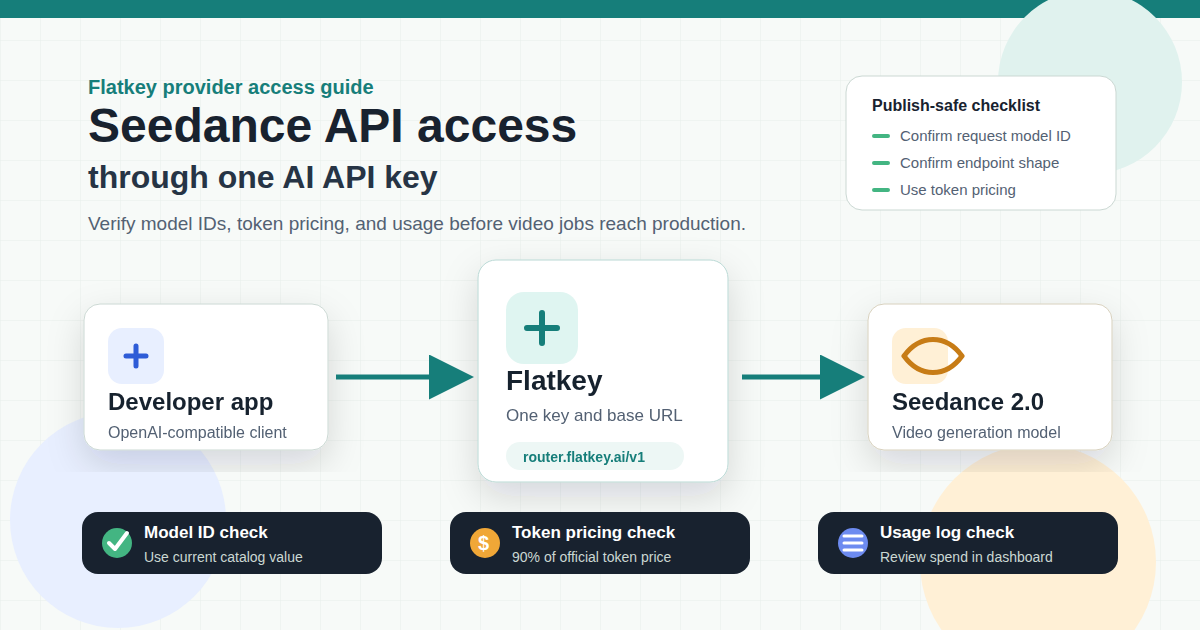
Flatkey is built for that access layer. Developers can use one API key, one dashboard, unified billing, and the OpenAI-compatible base URL https://router.flatkey.ai/v1 to route requests across supported models. For teams already evaluating video, image, and text models together, that makes Seedance API access easier to operate than another isolated provider account.
This guide shows how to verify Seedance 2.0 API availability, how to think about Seedance API pricing, and how to prepare a one-key Flatkey workflow before you send production video generation jobs.
Quick Answer
Use the Seedance API through Flatkey when your team wants one key, one prepaid balance, and one place to review usage across video, image, and text models.
For public pricing copy, use the current product-approved rule: Flatkey treats Seedance as token-priced access at 90% of the official token price. Do not describe Seedance API pricing as a per-second rate in external content, because generated seconds depend on resolution, duration, and request shape.
Before you move the Seedance 2.0 API into production, verify four things:
- The active Seedance API model ID in your Flatkey account.
- The endpoint type shown for that model.
- The current token pricing and model group.
- The official provider assumptions for resolution, duration, input type, and successful generation billing.
As of the 2026-06-10 pricing API rerun, Flatkey lists Seedance2.0-pro and Seedance2.0-fast under Seedance Official, and both entries support the openai endpoint type. The same pricing API also includes doubao-seedance-2-0 under the Standard group. Use the Flatkey catalog or console as the implementation source of truth before shipping.
What Seedance 2.0 Is
Seedance 2.0 is ByteDance's video generation model family. ByteDance positions Seedance around multimodal references, audio-video generation, and fine control over performance, lighting, shadow, and camera movement.
BytePlus ModelArk documents official video generation task APIs for direct provider access. That direct provider path is useful for understanding native task creation, task retrieval, authentication, reference assets, resolution, duration, watermark, and moderation behavior.
For developers searching for ByteDance Seedance API access, the practical question is whether to integrate directly with the provider or route the model through a gateway that already handles keys, billing, and usage review.
For gateway users, the important distinction is simple: official BytePlus docs explain native provider behavior, while Flatkey gives your team a single access layer for supported models. The Seedance API request you send through Flatkey should follow the model page or console instructions for the active Flatkey route.
Why Use Flatkey For Seedance API Access
Direct provider access is useful when your only goal is to call one provider. A gateway becomes useful when the Seedance API is one part of a broader model stack.
Flatkey's current product surface supports this pattern:
- One API key for connected AI models.
- One OpenAI-compatible base URL:
https://router.flatkey.ai/v1. - One dashboard for keys, usage, billing, and routing.
- Public model catalog and pricing pages.
- Seedance 2.0 availability alongside text and image models.
That setup is useful for developers testing Seedance API output against other video or image models, building internal evaluation scripts, or adding video generation to a product that already calls GPT, Claude, Gemini, DeepSeek, Qwen, or GPT Image.
Seedance API Model IDs To Verify
Do not copy a random Seedance model name from a blog post into production. Seedance API model IDs differ across official docs, gateways, and provider pages.
Use this table as the review checklist:
| Surface | Model ID Or Label | What It Means | How To Use It |
|---|---|---|---|
| ByteDance/BytePlus official docs | Official Seedance or Dreamina Seedance IDs | Native provider model identifiers and pricing references | Use for provider context and official pricing assumptions |
| Flatkey pricing API | Seedance2.0-pro |
Flatkey public model row in Seedance Official |
Verify in your account before production use |
| Flatkey pricing API | Seedance2.0-fast |
Flatkey public model row in Seedance Official |
Verify in your account before production use |
| Flatkey pricing API | doubao-seedance-2-0 |
Standard-group Seedance-related row | Confirm whether this is the intended route for your use case |
| Flatkey product copy | Seedance 2.0 |
Reader-facing model family label | Use in prose, not as a request ID |
The safe rule: use Seedance 2.0 in prose, then copy the exact request model ID from the Flatkey model catalog or console at implementation time.
Seedance API Pricing: Use Token Pricing
Seedance API pricing is easy to misread when different pages use different units. For this article and future external copy, Flatkey should use the product-approved token-first line:
Seedance through Flatkey is priced at 90% of the official token price.
That means developers should not model Flatkey Seedance API costs from a simple per-second claim. The number of seconds a video job can generate from a fixed budget depends on resolution, duration, input modality, and the exact model route. A five-second low-resolution test and a higher-resolution production clip are not equivalent workloads.
Use this Seedance API pricing checklist before launch:
| Check | Why It Matters |
|---|---|
| Official token price | Establishes the provider baseline for the selected Seedance model and request assumptions |
| Flatkey multiplier | Flatkey public copy should use 90% of the official token price |
| Resolution | Video generation cost changes when output quality changes |
| Duration | Longer outputs consume more budget than short tests |
| Input type | Text-to-video, image-to-video, and video/reference-driven jobs can have different cost behavior |
| Success/failure handling | Your billing review should distinguish completed, failed, moderated, and canceled jobs |
| Usage dashboard | Finance and ops need one place to review spend after the Seedance video generation API goes live |
For budget planning, document the selected model ID, the official token-pricing baseline, the 90% Flatkey pricing assumption, expected job volume, and quota cap. Then run a small smoke test and verify the usage log in Flatkey before opening the workflow to users.
Setup Workflow Through Flatkey
Use this Seedance API workflow when the goal is a controlled gateway setup rather than a one-off provider test.
- Create or sign in to your Flatkey account.
- Open the model pricing page and search for Seedance.
- Confirm the exact Seedance API request model ID available to your account.
- Confirm the endpoint type and token pricing group for that model.
- Create a Flatkey API key.
- Point your client at
https://router.flatkey.ai/v1. - Run a small smoke test and check the usage log.
- Set quota limits or team controls before production traffic.
- Record the model ID, token-pricing assumption, input assumptions, and expected output profile in your internal runbook.
For OpenAI-compatible client configuration, the base setup looks like this:
import os
from openai import OpenAI

client = OpenAI(
    api_key=os.environ["FLATKEY_API_KEY"],
    base_url="https://router.flatkey.ai/v1",
)

# Copy the exact Seedance model ID and request shape from your Flatkey model page.
# Video-generation request bodies can differ from chat request bodies.
Do not assume the official BytePlus task endpoint and the Flatkey gateway endpoint use the same URL or request body. The official provider docs are useful for understanding native behavior. The Flatkey console and model page should be the source of truth for the actual gateway request shape.
Direct Provider Access Versus One-Key Access
Direct ByteDance or BytePlus access gives you official provider docs and native ModelArk behavior. That is the right source for provider-specific task fields, reference assets, pricing assumptions, and region-specific documentation.
Flatkey's one-key approach is better when the Seedance API is one model in a larger stack. You can keep API keys, usage review, billing records, and routing policy in one place. That is especially useful when your app evaluates Seedance 2.0 alongside GPT Image, text models, or other video providers.
| Need | Direct Provider Account | Flatkey One-Key Gateway |
|---|---|---|
| Official task field reference | Strong | Use provider docs as reference |
| One key across multiple models | No | Yes |
| One billing view across models | No | Yes |
| Existing OpenAI-compatible client setup | Depends on provider path | Flatkey publishes https://router.flatkey.ai/v1 |
| Multi-model evaluation workflow | More manual | Cleaner |
| Token pricing review | Provider-native | Compare official token price with Flatkey's 90% pricing line |
Production Checklist
Before moving the Seedance API into production, check:
- Model ID: Is the model ID copied from the current Flatkey catalog or console?
- Endpoint type: Does the model page confirm the endpoint type your client will use?
- Input type: Is the job text-to-video, image-to-video, video-to-video, or multimodal reference-to-video?
- Resolution: Are output-quality assumptions documented?
- Duration: Are output duration and reference input assumptions documented?
- Pricing unit: Is the published cost model token-based and calculated from the official token price at Flatkey's 90% line?
- Failure handling: Does your workflow distinguish failed, moderated, canceled, and successful generations?
- Usage logging: Can ops and finance see cost in the Flatkey dashboard?
- Quota control: Is there a cap before users can trigger high-volume video jobs?
- Fallback plan: Is there another model or queue behavior if Seedance API capacity changes?
FAQ
Is there a Seedance API?
Yes. ByteDance and BytePlus provide official Seedance model and ModelArk documentation, and Flatkey public pricing data lists Seedance 2.0 routes. Verify the current Flatkey model ID before implementation.
What is the Seedance 2.0 API endpoint through Flatkey?
Start from Flatkey's OpenAI-compatible base URL: https://router.flatkey.ai/v1. Then use the endpoint shape shown in the current Flatkey model page or console for the active Seedance API route.
How should I compare Seedance API pricing?
Compare token pricing, not seconds. Flatkey's public copy should treat Seedance as 90% of the official token price, then validate the current catalog price and usage logs before production traffic.
Can I use one API key for Seedance 2.0 and GPT Image?
Flatkey is designed for one-key access across supported models. Confirm the active model IDs in your account, then use the same Flatkey key and dashboard to manage supported video, image, and text model usage.
What should I check before shipping a Seedance video generation API workflow?
Check the model ID, endpoint type, token pricing, input type, resolution, duration, quota limits, usage logs, and fallback behavior. Those checks matter more than a copied demo request because video generation cost and output behavior depend on the actual job shape.
View current model pricing or create a Flatkey key to test the Seedance API route available in your account.